International student guide to accept and pay tuition fees
Learn how to formally accept your offer and pay tuition fees before you can join us in Aotearoa New Zealand!
Accept your offer
To accept your unconditional offer, please log into MyWaikato (opens in a new tab) and click 'Accept Offer'. If you applied through an education agent, they can complete this step on your behalf.
Accepting your offer lets us know you intend to study with us and allows us to share important information about your next steps before you begin your studies.
Pay your tuition fees
After accepting your offer, you should pay the tuition fee for the first year of study or the first programme of study listed on your offer. Payment options for international students are listed below.
Once we receive your payment, we will issue an official receipt that you can use when applying for your student visa.
For more information about the student visa process, visit immigration.govt.nz (opens in a new tab).
Payment options

Students planning to travel to New Zealand can use this payment method.

Flywire payment portal
Flywire (opens in a new tab) is the preferred payment partner of the University of Waikato. Use Flywire’s global payment network to securely make an international payment from the safety and convenience of your home. Watch this video to learn how to make a payment with Flywire (opens in a new tab).
Supporting 140+ currencies across 240 countries and territories, Flywire’s flexible online payment options include secure bank transfers, card payments, and alternative payment methods such as PayPal, Alipay and WeChat Pay.
Flywire will continue to activate new payment methods as they become available to Flywire’s global payment network. Check out the “payment method” step in Flywire’s payment journey for the list of options available to you.
Flywire allows you to:
- Pay securely from banks worldwide
- Save on bank fees and foreign exchange rates, plus Flywire offers a Best Price Guarantee (opens in a new tab)
- Track the progress of your payment in Flywire’s app and receive SMS or email status updates
- Access 24/7 multilingual customer support via live chat, email, phone and WeChat for Chinese students
How to pay with Flywire
To make your payment, go to waikato.flywire.com (opens in a new tab) or click Pay Now with Flywire.
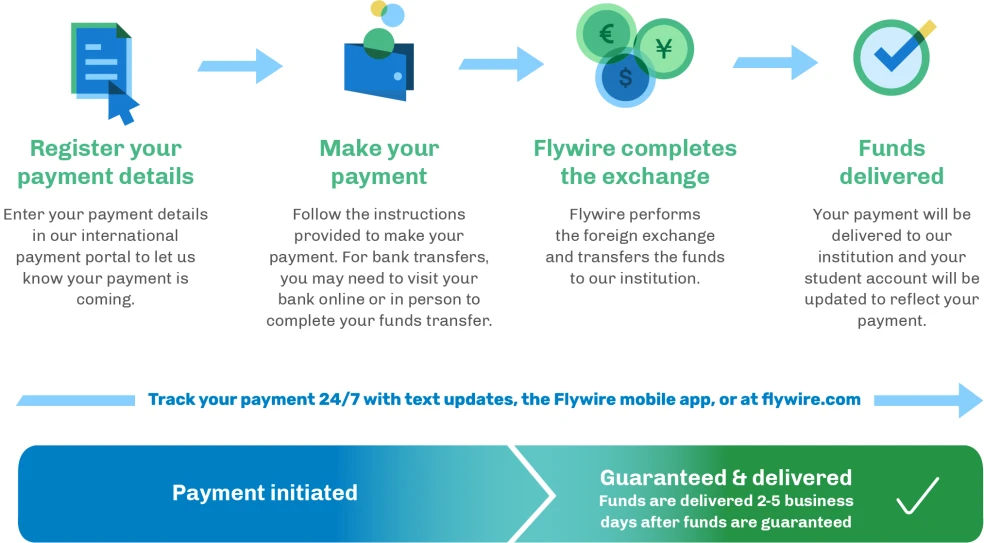
- Go to waikato.flywire.com (opens in a new tab).
- Enter your payment amount and country of origin. On the next page, select your payment method.
- Enter some basic information to create your payment booking.
- Follow the payment instructions precisely provided to send funds to Flywire. For debit/credit card payments, enter your card details online to complete your payment in your home currency. Note: Additional local payment options may be available depending on the country you are paying from.
- Receive text and email status updates each step of the way, including a confirmation when your payment has been delivered to your institution. You can also create a Flywire account and log into Flywire’s mobile app to track your payment online 24x7.
Flywire aims to provide the best price for international payments. If you find a better rate at your bank within two hours of booking a local currency bank transfer payment with Flywire, we will match it. For terms and conditions in accessing this program, please see their best price guarantee (opens in a new tab).
View a video of how to make your international payment here:
How do I contact Flywire's customer support?
Email: support@flywire.com (opens in a new tab)
Website: flywire.com/help
Phone options (opens in a new tab)
WeChat:
Students planning to travel to NZ and online students can use this payment method.

Convera payment portal
We also partner with Convera (opens in a new tab), formally Western Union Student Pay as an alternative option for fast, secure and reliable payment transfers.
Why use Convera?
- You will save money. There are no transfer charges from Convera (opens in a new tab) for this type of payment.
- It’s easy to use and you can make your payment faster and receive your receipt of payment sooner by making payments online, in-person or via bank transfer with Convera.
- You can pay in your own currency*, but your full payment amount will be made in New Zealand dollars.
- You will avoid foreign exchange conversion charges**
- Once you make the payment, the exchange rate is locked in for 72 hours, making sure that the full amount is paid.
- Convera (opens in a new tab) transfers are safe and reliable and you can track payment status updates via text and email.***
How to pay with Convera
You can pay from your bank account with a telegraphic transfer or domestic transfer.
Log on by clicking the link below and following the steps to make your payment.
https://students.convera.com/geo-buyer/waikato/#!/ (opens in a new tab)
If you need help please email: studentsupport@convera.com
*Services to customers may not be available in all countries, territories and currencies
**In limited circumstances, transaction fees may apply
*** If selected by payers messages and data rates may apply
Please note: Convera accounts are only for use for international transactions. If you have a New Zealand bank account and wish to transfer money within New Zealand, please see Alternative Payment Options.
The University of Waikato utilizes Convera payment services to process your tuition and associated fees. Please note that Convera does not process payments to, from or involving resident of Iran, North Korea, Cuba and the Crimea, Luhansk and Donetsk provinces of Ukraine. More information about sanctions and potential restrictions payments that can be processed is available through the Convera Website.
ASB Bank Ltd
Victoria St Branch
Hamilton
New Zealand
Account name: University of Waikato
Account number: 12-3122-0084728-00
Swift No. ASBBNZ2A
Routing No. ABA02100018
Please note when the Swift No. is entered, the bank address may be listed as:
ASB North Wharf
12 Jellicoe Street
Auckland
New Zealand
This is ASB's central bank address in New Zealand and we will still receive the payment from you.
When you have completed the telegraphic transfer application you must also provide a copy of the telegraphic transfer form to the Enrolment Office, via email: receivables@waikato.ac.nz
Enrolment
As an international student studying in New Zealand, you can only complete the final step of your enrolment once you arrive on campus and present us a copy of your student visa.
Before then, you can complete many of the required steps online, including accepting your offer, paying your tuition fees and selecting your papers. Please refer to our Student Enrolment Guide (PDF, 960KB) for guidance on each stage of the enrolment process.
Find out more about preparing to join us in Hamilton, Tauranga and New Zealand, including applying for or renewing your student visa and arranging accommodation.
International Students Pre-paid Tuition Fees Policy
View the University of Waikato's International Students Prepaid Tuition Fees Policy.
Refund of pre-paid tuition fees
There is a specific process that must be followed when applying for a refund of pre-paid tuition fees.
Contacts
If you need any further queries, please feel free to contact us anytime, we will be happy to help you.