Scholarship FAQs
Find answers to common questions about applying for a University of Waikato scholarship, including information on referees, application tracking, and what happens after you submit.
This page also covers information on payment schedules, doctoral scholarship regulations, and troubleshooting technical issues with the online portal.
If you are looking for specific information for school leavers or international students, try these pages:
-
How to apply for scholarships and awards. A step-by-step guide to the application process.
-
Scholarship information for school leavers. Details on timelines and accommodation-specific awards.
-
International scholarship FAQs. Guidance tailored for international applicants.
If your question isn't answered here, our Scholarships Team (opens in a new tab) is happy to help.
Applying for a scholarship

All scholarships, including school leaver scholarships, follow the same application process.
Log in to your MyWaikato (opens in a new tab) portal and follow the steps outlined in the scholarship application process to get started.
Once you submit your application through MyWaikato (opens in a new tab), an email is automatically sent to each referee you nominate. The email contains a link and instructions for completing and submitting their reference directly to your application.
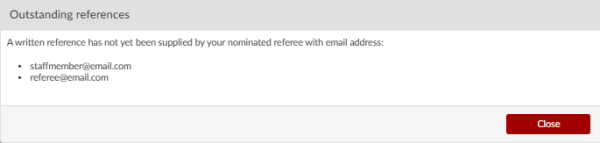
Log in to your MyWaikato (opens in a new tab) portal and go to the Scholarships tab. Click the hyperlink under "Referee Responses" to see which referees have submitted and which are still pending. Note that referees are responsible for uploading their own responses — late submissions cannot be accepted.

In your MyWaikato (opens in a new tab) portal, go to the Scholarships tab and select Manage referee(s) next to the relevant application.

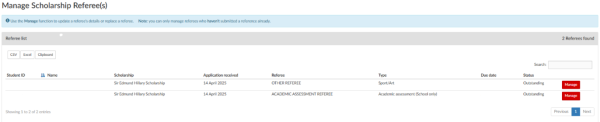
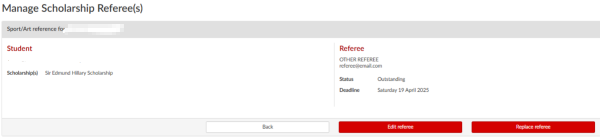
Use Edit referee to update a referee's name.
If you need to change an email address, use Replace referee - this will notify the previous referee that their reference is no longer required and send a new request to the replacement.
For school leaver applications, academic assessments are requested directly from your school after the scholarship closing date. Referees have 10 days from the closing date to provide their assessment.
Log in to your MyWaikato (opens in a new tab) portal and go to the Scholarships tab. You can view all applications you have submitted or started. If an application shows as Incomplete, you have not yet submitted it. Click Continue Application to finish. You can also withdraw an application from this tab.
After you apply
Current scholarship recipients, including doctoral scholars, can request a variation using the Scholarship Variation Request Form (opens in a new tab). This covers changes that fall outside the approved scholarship regulations.
Scholarship decisions are typically communicated within six to eight weeks of the closing date. You will receive a notification in your MyWaikato (opens in a new tab) portal in-tray once your application has been processed and the Selection Panel has reached a decision.
If the regulations of two scholarships prevent you from holding both, contact the Scholarships Team (opens in a new tab). They will explain what each scholarship provides so you can make an informed decision about which offer to accept.
Contact the Scholarships Team (opens in a new tab) as soon as possible with your scholarship details. There may still be funding available depending on your circumstances.
Payments and fees
If your scholarship includes a cash component, you will be prompted to enter your bank details when accepting your offer. The scholarship regulations specify when instalments are due, and this information also appears in your MyWaikato (opens in a new tab) portal under the Scholarships tab.
Payments are processed overnight on the first Wednesday following the listed payment date. If you have not received payment by that Friday, contact the Scholarships Team (opens in a new tab).
Log in to your MyWaikato (opens in a new tab) portal and select Edit Details from the dropdown next to your name. Click Bank Details.
Enter your account number and account name, confirm the account belongs to you, and click Submit.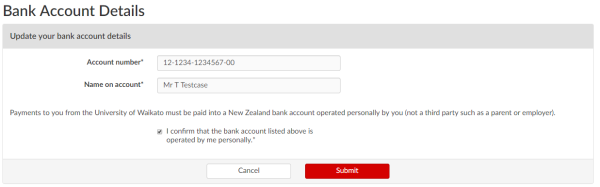
If the scholarship was awarded through MyWaikato (opens in a new tab), contact the Scholarships Team (opens in a new tab) before accepting your enrolment agreement so the scholarship amount can be deducted from your fees first.
If it is an external scholarship, print and sign your enrolment agreement, clearly note the scholarship name, and email it to info@waikato.ac.nz or deliver it in person to Te Manawa | The Student Centre.
If your scholarship doesn’t cover the full amount, use an alternative payment method to pay the remaining tuition fees after submitting your enrolment agreement.
Log in to your MyWaikato (opens in a new tab) portal and go to the Finance tab. If you are eligible for a personal refund, click Apply for a refund and follow the instructions.
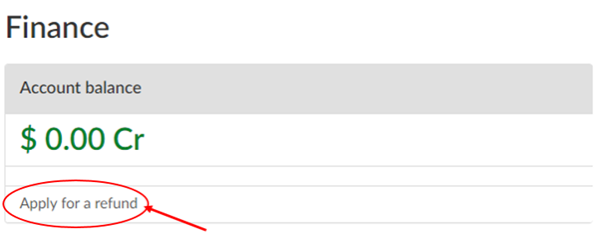
StudyLink (opens in a new tab) refunds are processed automatically, but you can also apply through the portal to expedite them.
Doctoral scholarships
You can be considered for a University of Waikato Doctoral Scholarship a maximum of two times, regardless of the research topic or selection panel.
You may apply for a doctoral scholarship on up to two occasions. If your first application is unsuccessful, you may submit a second application in a future round, provided you remain eligible.
To be eligible for consideration, you must not have commenced your doctoral enrolment by the closing date of the application round in which you apply. To retain the option of a second application, it is important to take this requirement into account when planning the timing of your enrolment and scholarship applications.
Yes. If you reapply for a doctoral scholarship, you may submit updated information and supporting documentation as part of your new application. Applicants are encouraged to include any new achievements or relevant information that has become available since their previous application.
The reduced-tenure scholarship is no longer offered. Students who have achieved confirmed enrolment may be eligible to apply for the University of Waikato Doctoral Catalyst Scholarship, which does not require nomination by a supervisor. Applications are made directly by the student.
The University of Waikato Doctoral Catalyst Scholarship is a competitive scholarship that recognises research excellence. Applicants are expected to demonstrate achievement appropriate to their stage of candidature, including research outputs, research leadership and collaboration, and contributions to the wider research community.
Please refer to the scholarship regulations and application dates for further information.
Ask your supervisor to contact the Scholarships Team to request a GPA update for your application. If the updated qualification is from an institution other than the University of Waikato, you will also need to provide your academic transcript to your supervisor so the GPA can be recalculated.
No. The two-consideration limit applies regardless of topic or panel. You may apply for special consideration by submitting a Scholarship Variation Request (opens in a new tab) if you believe exceptional circumstances apply.
Email scholarships@waikato.ac.nz with your name, student ID, and the name of the scholarship application you wish to re-open. The team will notify you once your application is available to edit again.
Technical help
Try these steps in order:
- Clear your browser's cache and cookies
- Ensure your browser and device software are up to date
- Try a different browser such as Chrome, Firefox, Safari, or Edge
- Disable any VPN you are using and if possible, try from a different device.
If the problem persists, contact the Scholarships Team (opens in a new tab) with your device type, operating system and version, browser and version, and any screenshots of the error.
International students
International students should refer to the dedicated International Students Scholarship FAQ page for scholarship details relevant to their situation, as well as the International Students section for information on how to apply to enrol.